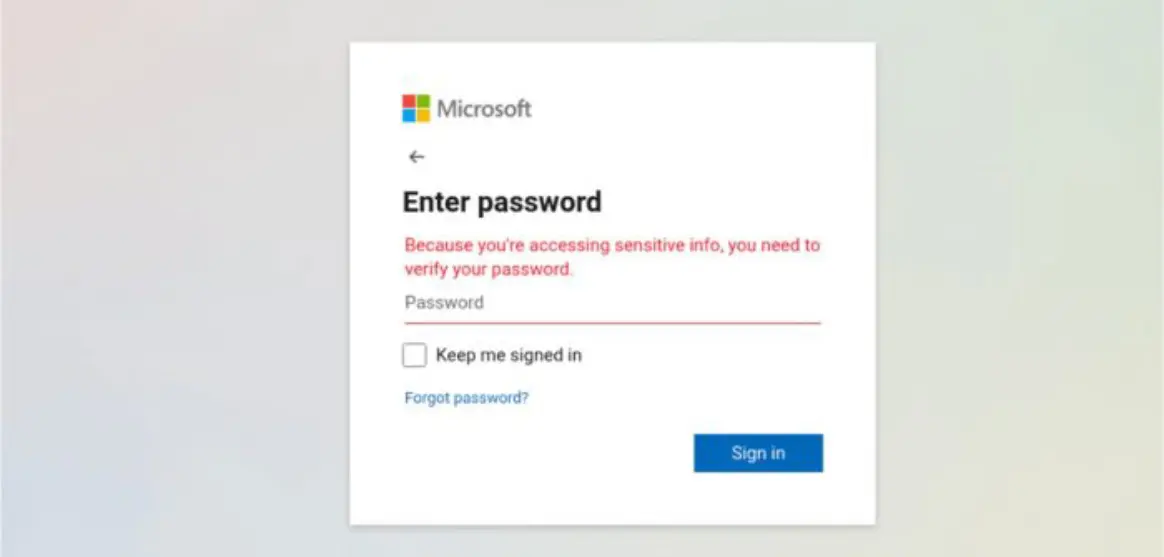
We’re seeing this attack everywhere in the wild right now.
A real contact of yours emails you a file to review. You click. A Microsoft sign in appears. You log in. The file never opens.
𝐖𝐡𝐚𝐭 𝐢𝐬 𝐚𝐜𝐭𝐮𝐚𝐥𝐥𝐲 𝐡𝐚𝐩𝐩𝐞𝐧𝐢𝐧𝐠:
Attackers hijack a mailbox, then send an email to everyone in the address book. The link leads to a lookalike Microsoft page that collects your password and often your MFA token, then uses your account to spread the same trick.
𝐇𝐨𝐰 𝐭𝐨 𝐬𝐩𝐨𝐭 𝐢𝐭:
• A sign in page before you can view the file
• The address bar is not microsoft.com or office.com
• Tone or urgency that feels off for that sender
• Shortened links, odd redirects, or a page that reloads with no file
𝐖𝐡𝐚𝐭 𝐭𝐨 𝐝𝐨 𝐢𝐧 𝐲𝐨𝐮𝐫 𝐛𝐮𝐬𝐢𝐧𝐞𝐬𝐬:
• Do not sign in from email links. Open office.com from a bookmark
• Verify the email is legitimate with the sender via phone or other method
• Enforce MFA for everyone and disable legacy authentication
• Put protection inside Microsoft 365. We run Avanan for our clients to block compromised sender blasts, fake login pages, and token theft before staff ever see them
Trust the person, not the email. If you’re asked to sign in before you can open a file, stop and check first.